How to Build a Website: Step-by-Step Planning
Walks through the steps from setting goals to domain, content, design and launch, showing which decision is needed at each stage and the common mistakes.
 Aurora YazılımEditorial team
6 min read
Aurora YazılımEditorial team
6 min read
To build a website, first define the site's purpose and target audience, then choose a domain name and hosting. Draw up the sitemap, prepare the text and images, and create the design mobile-first. Finally, run speed, form and browser tests and launch the site; then start tracking with Search Console and analytics tools.
Clarify the Goal First
Building a website is a business decision before it is a technical job. What do you expect from the site? Collecting quotes, taking appointments, selling products, receiving reseller applications or simply offering a credible presentation all need very different structures.
Starting the design without a clear answer to this question is a sign of big changes to come later. Write the goal in one sentence: “Our site will get businesses to send us a quote request form.” That sentence becomes the yardstick for every later decision.
Then define your target audience. Who are your visitors, what device do they come from, what are they looking for and what words do they use to find you? This information guides both content and design decisions.
Choose the Type of Site
Once the goal is clear, the type of site you need becomes clear too. Each type has its own pages, functions and technical requirements.
| Site type | Who it is for | Core function |
|---|---|---|
| Corporate site | Service and manufacturing companies | Presentation, trust, quotes and contact |
| One-page site | A single product, event or campaign | Short, focused message |
| Landing page | Advertising campaigns | A single conversion goal |
| E-commerce site | Businesses selling online | Products, cart, payment, shipping |
| Booking site | Hotels, restaurants, clinics | Date selection and reservations |
| Portal and listing site | Real estate, classifieds, directory platforms | Registration, search, filtering |
Domain and Hosting Selection
A domain name is your site's address on the internet. Choose one that is short, easy to type, memorable and consistent with your brand. Avoid special characters, hyphens and numbers if you can, as they can cause confusion. For businesses operating in Türkiye, a .com.tr extension builds trust; also registering the .com extension is a practical way to protect your brand.
Hosting is the server where your site's files are kept. When choosing, look not only at price but at server speed, backup frequency, SSL support, quality of technical support and the server's location. If your visitors are in Türkiye, a nearby server or a content delivery network (CDN) reduces latency.
Be sure to register the domain in your own name or your company's name. Having the domain registered in the name of an agency or an employee can cause serious problems later when things change.
- Mark the domain renewal date in your calendar and turn on auto-renewal.
- Keep your domain management panel password in a safe place.
- Know who manages the DNS records.
- Set up your business email addresses (ad@firmaniz.com) on the same domain.
Sitemap and Content Plan
The sitemap is the plan that shows which pages the site will consist of and how they link together. For a simple corporate site, a home page, about, services, references, blog and contact is a good start. Opening a separate page for each service is one of the most effective ways to be visible in search engines.
Content is the real value of a site. Text should answer visitors' questions and be written in your customer's language rather than technical jargon. Every page should have a single purpose and a clear call to action: call, request a quote, book an appointment.
Images are part of the content too. Use real photos of your team, premises, products and projects wherever possible. Stock images offer a quick fix but cannot replace real photos in building trust.
Design: Brand and User Experience
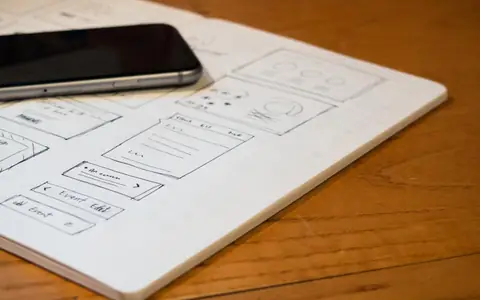
The design stage starts with page layout, not with logos and colors. First, wireframe sketches decide what information goes where; then brand colors, fonts and visual language are added. If your corporate identity is not yet settled, brand management work should be done before the design.
Because most visitors will enter the site from a phone, starting the design from the small screen is the right approach. With mobile-friendly design, menus, buttons and forms are laid out to be comfortable to use with a finger.
A common question at this stage is whether a ready-made template is enough. A template offers a quick start but brings limits in brand differentiation, speed and flexibility. We compared the two approaches in detail in our ready-made theme or custom design article.
Development, SEO and Testing
Technical quality is also determined as the approved design is turned into code. Clean code, optimized images, a proper heading hierarchy and meaningful URLs affect both speed and search visibility. To set these up right from the start, adopt an SEO-friendly web design approach.
Be sure to run these tests before launch:
- Appearance in different browsers (Chrome, Safari, Firefox, Edge) and on different devices.
- Whether forms reach the right address, and automatic reply emails.
- That all internal and external links work, and the 404 page.
- Page speed and Core Web Vitals values.
- SSL certificate and https redirect.
- KVKK (Turkish data-protection law, comparable to GDPR) privacy notice, cookie notice and form consent checkboxes.
Launch and the First Weeks
Launch day is not when the work ends but when measuring begins. As soon as the site goes live, add it to Google Search Console, submit the XML sitemap and set up an analytics tool. If you have an old site, make sure old addresses are connected to the new pages with 301 redirects.
In the first weeks, watch which pages get visits, where visitors leave and how often forms are filled in. This data shows which parts of the site need strengthening.
Update the new site address everywhere you appear digitally, such as your Google Business Profile, social media accounts and email signatures. Writing your address, phone and company name in the same format everywhere keeps local search results consistent.
Do It Yourself or Hire a Professional?
For a simple personal page, website builder tools may be enough. But for a site that will collect inquiries for your business, compete in search engines and be used for years, a professional team that manages strategy, design, code and SEO together is usually more efficient in time and cost.
When deciding, it is important to read the budget items correctly. We explained the factors that set the price in our web design prices article, and the path to follow if you are considering overhauling an existing site in our website redesign guide. If you have an online sales goal, planning an e-commerce platform from the start is more sensible than a corporate site.
Frequently Asked Questions
01What do I need to launch a website?
Basically you need a domain name, hosting, an SSL certificate and the site's content. Beyond these, design, an admin panel and functions such as forms or payment are planned according to the site's purpose.
02How long does having a site built take?
It depends on the number of pages, functions, approval speed and whether content is ready. Projects with a clear scope and ready content finish much faster; multilingual or integrated sites need longer planning.
03What should I do after the site goes live?
Update the content regularly, follow backups and security updates, and check the alerts in Search Console. Blog posts and new service pages increase the site's search visibility over time.
04Should the domain and hosting be bought from the same place?
It is not required. Managing from one place is practical; buying from separate companies gives flexibility if you have a problem with one. What matters is that both accounts are registered in your company's name and that you have access.
The shortest answer to how to build a website is to choose the goal first and the tool second; a project that follows the right order protects both budget and time. For support at every step from planning to launch, explore our web design service and our corporate website solutions for companies, and reach us through our contact page to talk about your project.